Efficient job scheduling is critical for businesses striving to maximize productivity, meet deadlines, and manage resources effectively. Job scheduling software has emerged as a transformative tool, enabling organizations to allocate tasks, manage workforce schedules, and streamline operations with precision.
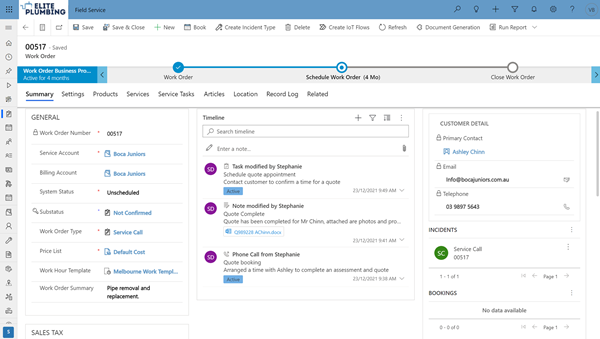
In this article, we explore the key features, benefits, and applications of job scheduling software. We’ll also highlight how solutions like FieldConnect by XR Elements can revolutionize job scheduling for businesses in various industries.
What is Job Scheduling Software?
Job scheduling software is a digital solution that automates the allocation, monitoring, and management of tasks across teams or departments. It helps businesses organize work schedules, assign resources efficiently, and track progress in real time.
By leveraging job scheduling software, businesses can:
- Plan and assign tasks seamlessly.
- Monitor task progress and completion.
- Manage team workloads and availability.
- Optimize resource utilization to reduce downtime.
The Importance of Job Scheduling Software
In today’s fast-paced business environment, manual scheduling methods like spreadsheets and paper logs are no longer sufficient. Job scheduling software provides a centralized platform to handle complex scheduling needs, delivering several advantages:
1. Enhanced Productivity
By automating task assignments and schedules, job scheduling software minimizes manual effort and ensures that employees focus on high-value tasks.
2. Real-Time Visibility
Managers gain real-time insights into job statuses, helping them identify bottlenecks and address delays proactively.
3. Improved Resource Utilization
Scheduling tools optimize the allocation of human and material resources, reducing downtime and maximizing efficiency.
4. Streamlined Communication
Job scheduling software fosters seamless communication between managers and employees, ensuring everyone stays on the same page.
5. Scalability
As businesses grow, their scheduling needs become more complex. Job scheduling software scales with the organization, maintaining efficiency at every stage.
Key Features of Job Scheduling Software
The best job scheduling software is packed with features designed to simplify task management and improve operational efficiency. Here are the core features to look for:
1. Task Assignment and Prioritization
Assign jobs to specific team members or departments, prioritize tasks, and set deadlines to ensure critical projects are completed on time.
2. Calendar Integration
Sync job schedules with tools like Google Calendar or Outlook to provide a unified view of tasks and deadlines.
3. Real-Time Tracking
Monitor task progress in real time and receive updates on job statuses to ensure schedules remain on track.
4. Mobile Access
Access schedules and task details on the go with mobile apps, ensuring flexibility for field workers and remote teams.
5. Automated Notifications
Send reminders and alerts to employees about upcoming tasks, reducing missed deadlines.
6. Reporting and Analytics
Generate detailed reports on task completion rates, resource utilization, and overall performance to drive data-driven decision-making.
7. Integration Capabilities
Integrate job scheduling software with other business tools, such as customer relationship management (CRM) systems and enterprise resource planning (ERP) platforms.
How FieldConnect by XR Elements Simplifies Job Scheduling
When it comes to managing complex schedules and tasks, FieldConnect by XR Elements stands out as a leading job scheduling software solution. Designed to cater to businesses of all sizes, FieldConnect combines powerful features with user-friendly functionality to transform job scheduling processes.
Key Features of FieldConnect
- Dynamic Job Assignment: Assign tasks based on employee availability, skill sets, and job requirements to ensure optimal resource allocation.
- Real-Time Updates: Managers and employees receive instant updates on task progress, ensuring schedules remain accurate and up-to-date.
- Customizable Dashboards: Tailor dashboards to display the most relevant information for your business, providing quick access to key metrics.
- Mobile-Friendly Interface: FieldConnect’s mobile app allows field workers to access schedules, update job statuses, and communicate with managers from anywhere.
- Drag-and-Drop Scheduling: Simplify job allocation with an intuitive drag-and-drop interface, making it easy to adjust schedules on the fly.
- Integration with Existing Systems: Seamlessly connect FieldConnect with other tools like CRMs, payroll systems, and inventory management software for a unified workflow.
- Detailed Reporting: Leverage analytics to identify trends, improve job allocation strategies, and optimize overall performance.
Benefits of Using FieldConnect
- Increased Efficiency: Automate routine scheduling tasks to save time and reduce errors.
- Improved Communication: Keep teams informed with real-time updates and notifications.
- Optimized Resource Management: Allocate resources effectively, minimizing waste and maximizing productivity.
- Enhanced Customer Satisfaction: Meet deadlines consistently, improving service delivery and client trust.
- Scalability: Whether you’re a small business or an enterprise, FieldConnect grows with your operations.
Industries That Benefit from Job Scheduling Software
Job scheduling software is a versatile tool that caters to a wide range of industries. Here are some examples:
1. Field Service Management
Industries like HVAC, plumbing, and IT services use job scheduling software to manage field technicians, optimize routes, and ensure timely service delivery.
2. Manufacturing
Manufacturers rely on scheduling tools to coordinate production tasks, manage resources, and meet tight deadlines.
3. Healthcare
Healthcare providers use job scheduling software to manage appointments, allocate staff shifts, and track patient care tasks.
4. Construction
Construction companies benefit from scheduling tools to coordinate labor, equipment, and materials across multiple job sites.
5. Retail and Hospitality
Retailers and hospitality businesses use scheduling software to manage staff shifts, coordinate inventory tasks, and streamline customer service operations.
Best Practices for Implementing Job Scheduling Software
To maximize the benefits of job scheduling software, follow these best practices:
1. Define Clear Objectives
Identify your business’s specific scheduling challenges and set clear goals for what you want to achieve with the software.
2. Train Your Team
Provide comprehensive training to ensure employees understand how to use the tool effectively.
3. Customize the Software
Tailor the software’s settings and features to align with your business’s unique needs.
4. Integrate with Existing Systems
Connect the software with other business tools to create a seamless workflow.
5. Monitor and Optimize
Regularly review reports and analytics to identify areas for improvement and adjust your scheduling strategies accordingly.
Conclusion
In an era where efficiency and productivity are paramount, job scheduling software is an indispensable tool for businesses across industries. By automating job allocation, tracking progress in real time, and providing actionable insights, these tools enable organizations to stay ahead of the competition.
Solutions like FieldConnect by XR Elements take job scheduling to the next level, offering advanced features, seamless integration, and unmatched flexibility. Whether you’re managing field service teams, coordinating manufacturing tasks, or organizing staff shifts, FieldConnect empowers your business to operate at peak efficiency.

No comments:
Post a Comment